Key Takeaways:
- A branded tracking page shows order status, carrier location, and estimated delivery date on your store’s site instead of a third-party carrier’s.
- More than 90% of buyers actively track their orders, making this one of the highest-traffic post-purchase touchpoints in your store.
- An effective branded tracking page includes real-time status updates, shipment details, and consistent brand elements.
Quick question: after a customer buys from your store, where do they go to track their order? If the answer is a third-party carrier website, you’re handing off one of the most-visited moments in your customer’s journey to someone else.
A branded tracking page changes that. It shows buyers real-time updates like shipping status, location, and expected delivery date, including last mile delivery tracking as their order makes its final journey to the door. This guide covers what it is, what to put on it, and how to know if it’s working.
What is a Branded Tracking Page?
A branded tracking page turns boring shipment tracking into a personalized experience that looks like your store. It shows buyers real-time updates like shipping status, location, and expected delivery date—all wrapped in your logo, colors, and style to reflect your brand’s identity.
Instead of sending customers to a third-party carrier site, branded tracking keeps them engaged on your page, building trust and boosting brand loyalty with every click.
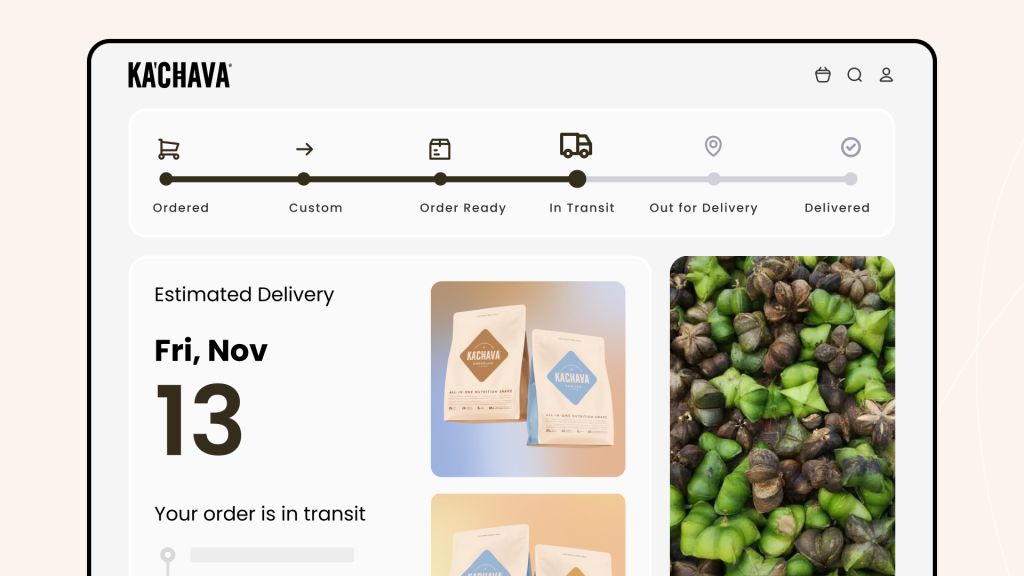
Take Ka’chava as an example. The brand implemented CWILL Order Tracking to bring their customers’ order tracking under one roof. After the change, Ka’chava had a single branded tracking page where shoppers could check real-time shipment status and delivery progress without ever leaving the store.
Benefits of a Branded Tracking Page for Your Shopify Store
A branded tracking page helps reduce repeated inquiries, improves customer experience, boosts customer confidence and loyalty, and gives you an opportunity to cross-sell/upsell relevant products.
Core Benefits of a Branded Tracking Page:
- Reduces Customer Inquiries About Order Status: A detailed branded tracking page can reduce your ‘WISMO‘ (where is my order) calls. For example, Pipeliners Cloud saw an 83% drop in WISMO calls after using CWILL Order Tracking. The app freed up their customer support team so they could deal with other important issues, like handling dissatisfied customers and updating inventory.
- Creates Upselling and Cross-Selling Opportunities: Your tracking page is prime ad space. The best way to utilize this space is to feature products based on purchase history and preferences while buyers wait for their order.
- Reduces Anxiety-Driven Returns: Some returns have nothing to do with the product. A buyer who hasn’t heard anything for two weeks assumes something went wrong and requests a refund. A branded tracking page keeps customers informed at every stage of the delivery journey, reducing returns driven by anxiety rather than dissatisfaction.
Key Features of an Effective Branded Tracking Page
A personalized order update page doesn’t have to be complicated. It should contain only important information, such as shipping details, real-time status updates, shipping process visualization, and your company’s branding elements.
Here’s What Your Branded Tracking Page Should Have:
- Shipment Details: It should have the tracking number, the carrier name, and the expected delivery date. If a buyer has ordered multiple items, the tracking page should provide details for each of them to prevent confusion.
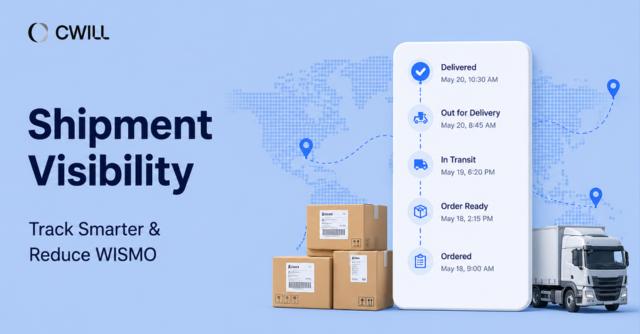
- Real-Time Order Status Updates: The first thing buyers want to see as soon as they open the branded tracking page is the live status: order confirmed, order packed, in transit, out for delivery, delayed, delivered, etc.
- Shipping Process Visualizations: You can create colorful progress bars with visual indicators of an order’s shipping status. Another idea is to create a timeline using icons or graphics to represent the current status.
- Marketing and Branding Elements: Once you have included the above details on the page, you can use the remaining space to include whatever you think is relevant. We recommend having your logo, a thank you message, and social share buttons.
How to Create Your Branded Tracking Page
You have three options, and the right one depends on your volume and your carrier mix.
Option 1 — Customize Shopify’s native order status page. You can add your logo, colors, and a product recommendation block through the checkout customization settings. This works well if you ship domestically with one or two carriers and short delivery windows. Merchants tend to outgrow it when they add international lanes or multiple carriers.
Option 2 — Build it against carrier APIs. Full control, and the right call if you have unusual routing or a carrier nobody integrates with. You’ll want to budget for a developer to build and maintain it. The major carriers version their APIs and publish deprecation notices; regional and international postal carriers are far less predictable.
Option 3 — Use a post-purchase app. Utilizing an app like CWILL Order Tracking is the fastest path to a working page, and the carrier integrations and status normalization are maintained for you.
Here’s How to Install CWILL Order Tracking:
- Install CWILL Order Tracking from the Shopify App Store. No developer needed.
- Connect your carriers. The app integrates with 1,600+ carriers worldwide, including USPS, UPS, DHL, and FedEx.
- Customize your tracking page. Add your logo, brand colors, and fonts so the page matches the rest of your store.
- Add the tracking link everywhere buyers expect it — your main nav, footer, and order confirmation emails. Notification emails can include a direct link to the page so customers never have to search for it.
- Turn on automated notifications. Buyers receive real-time shipping updates automatically at every milestone.

#1 Shopify Tracking Solution for eCommerce
Best Practices for Optimizing Your Branded Tracking Page
Once your tracking page is live, the work isn’t done. Here’s how to make sure it’s actually pulling its weight.
- Translate carrier language into plain language: Raw carrier scans say things like “ARRIVED AT SORT FACILITY — ISC NY.” That means nothing to a customer and generates the exact inquiry you built the page to prevent. Map every carrier status to a sentence a person understands.
- Design the exception state first, not last. Most merchants build a beautiful “in transit” view and let failures fall through to a generic error. But the customer looking at a stalled shipment is the one about to email you, leave a bad review, or file a chargeback. That screen needs to say what happened, what you’re doing about it, and when they’ll hear from you next. Get this right and you’ve solved the majority of your post-purchase support load.
- Make product recommendations delivery-stage aware. A static recommendation block is a banner ad. Someone three days from delivery is browsing; someone whose package just arrived is in a completely different frame. If your tool supports it, change the block by status.
Measuring the Success of Your Branded Tracking Efforts
Below are a few of the core metrics you’ll want to track to measure the success of your page.
| Metric | What to look at | What it tells you |
| Page views | How often customers visit the tracking page | More visits mean more engagement with your brand post-purchase |
| Time on page | How long buyers spend there | Longer sessions often mean they’re browsing product recommendations |
| Click-through rate | Whether buyers click recommended products | High CTR means your recommendations are relevant |
| WISMO calls | Volume of “where is my order?” inquiries over time | A significant drop means the page is giving buyers what they need |
Conclusion: Elevating Your Post-Purchase Journey with Branded Tracking
Your buyers don’t stop paying attention the moment they check out. If anything, that’s when they’re watching most closely. A branded tracking page makes sure what they see during that wait reflects well on you.
Do it well and you’ll field fewer support emails, build real trust, and give people a reason to come back. CWILL Order Tracking makes the setup straightforward, so you’re not starting from scratch.
Start a free trial today and see it running on your own store
FAQs
A branded tracking page reduces WISMO calls by giving customers self-serve access to real-time order status around the clock, so they don’t need to contact support.
Yes. An order status page shows basic shipping milestones and typically redirects to the carrier’s site for tracking. A branded tracking page keeps customers on your Shopify store, matches your brand identity, and can include personalized product recommendations.
Yes. Apps like CWILL Order Tracking let you set up and customize a branded tracking page without any development experience. They connect to 1,600+ carriers and update tracking data automatically.
At minimum, a branded tracking page should include: a tracking number, carrier name, real-time status updates, expected delivery date, and your brand’s logo and colors.
Note: This blog was originally written in English and translated using an automated tool to make the content accessible to a global audience. We believe in sharing valuable insights with everyone and apologize for any inaccuracies. If you spot any errors, please feel free to contact us for corrections. Your feedback helps us improve and ensures the content’s value is fully realized.

Content Director | 9+ years decoding B2C & B2B eCommerce, obsessed with SaaS and retail storytelling
Words are my weapon—crafting killer copy, decoding trends, and turning data into gold. When not strategizing: Coffee addict, pun enthusiast, and book lover. Ready to level up your eCommerce game? Let’s chat. ☕️