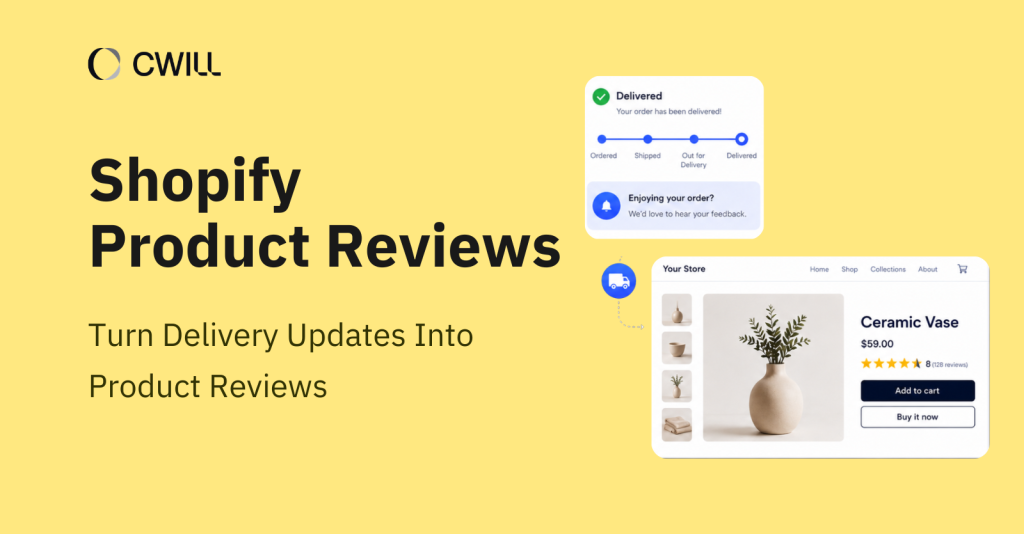
Shopify product reviews don’t have to be collected manually or from standalone review emails. Many ecommerce brands can actually collect them more effectively with the use of ecommerce product reviews software and post-purchase delivery updates and order tracking pages.
In this article, we’ll share why these post-purchase opportunities work so well for collecting reviews, how you can connect them into one review workflow, and some best practices for getting more authentic customer feedback.
Why Shopify Brands Struggle to Collect Reviews After Purchase
Often, Shopify brands miss the opportunity to get reviews because their request strategy is detached from the whole post-purchase journey.
Customers usually don’t return to an online store after delivery without any special reason, or leave feedback if there’s no convenient path to do so.
Timing and email content also affect the chances of getting reviews.
A request sent before delivery gives customers little to comment on, while a request sent too late may arrive after the initial product experience has faded. Generic review emails can create another barrier when they do not feel connected to the customer’s order or product experience.
💡For broader guidance on request timing, copy, and follow-up, read our guide on how to ask customers for reviews.
Why Delivery Updates Are a Natural Moment to Ask for Feedback
Customers naturally pay attention to delivery updates because they’re waiting for their orders to arrive. That’s what makes them a great time for review collection. But that doesn’t mean that you should include a review request for every shipping notification.
There’s one that can give you a more accurate timing signal: Delivered status. It confirms that the order has arrived, which is much more reliable than sending a request a fixed number of days after purchase.
You can use it as the starting point and decide when to ask for feedback based on your product. Apparel is easy to try on. But with some products (like skincare, supplements, and gadgets), customers may need more time to use the product and leave meaningful feedback.
How Order Tracking Pages Create Review Opportunities
Emails and SMS are the most common “tools” for collecting authentic customer reviews, but so are order tracking pages. You can use it to:
- Display product ratings on recommended products
- Give customers a clear place to leave a review (after they receive their item)
- Connect product discovery and feedback collection in one post-purchase touchpoint
Because a branded tracking page can reflect the rest of your post-purchase experience, customers may have one consistent place to view ratings and leave feedback.
Once you do this, your order-status touchpoint levels up from a support page where you attend to “Where is my order?” questions to a place where you get answers on “How was our product?”
Three Delivery Moments That Create Review Opportunities
Delivery updates do more than tell customers where their order is. They can also create a good moment for collecting product reviews.
Ask When the Product Experience Is Still Fresh
The Delivered status confirms that the customer has received the order, but they may still need time to use the product before leaving a review.
A better request comes after customers have had enough time to form a real opinion based on their experience. Rather than applying the same schedule to every order, use the “delivered date” as the starting point and decide how long to wait before sending the review request based on the product experience.
Use the Tracking Page as a Post-Purchase Review Entry Point
Collecting reviews goes beyond emails and SMSs.
After receiving the items, customers may reopen the tracking page to confirm order details or view shipment information. If you put a review entry on this page, you’ll have another channel to collect feedback, especially for those who haven’t opened the first review request email.
Make the Review Request Connected to the Order
Emails that seem to be all reviews are easy to overlook. If the request can mention the specific product the customer just received, it will feel more appropriate and natural.
Bring out the product name, keep the content brief, and provide customers with a clear feedback channel. Our goal is not to include a request for evaluation in every communication but to make a comment at the right moment.
Best Practices for Turning Delivery Updates Into Shopify Product Reviews
If you want to build a solid review system from delivery updates, you have to get three things right: your request schedule, message, and follow-up.
Match Your Review Request to the Product
You need to consider the product type and the experience cycle to adjust the review delay. Because that’s what makes your request relevant to the customer. Even if you’re selling items in the same category, their usage and results may not be the same.
Let’s say that you offer multiple items under beauty essentials: shampoos, face masks, and serums. A shampoo may only need a few washes, but a serum or face mask? They take longer before customers see any changes.
The same idea applies to other products, too. Apparel can usually be reviewed after customers have worn it once or twice, while supplements and durable goods often need more time before customers can give honest feedback.
Create a Review Request That Feels Natural
Keep your review request short, friendly, and easy to answer.
Start with a quick moment of gratitude. You can add a simple message together with the “thank-you” heading. Also, use a clear (and unbiased) CTA like “Rate Your Purchase” or “Share Your Feedback.” You may also allow photos and video reviews for stronger social proof, but keep it optional.
If you need some ideas for your email, check some examples from review request email templates.
Set Up a Thoughtful Follow-Up
Often, your customers just don’t have the time to leave a review the first time they see your request. What’s the best thing to do? Send one gentle reminder.
You should also keep the review entry points consistent within your Shopify store, email, and SMS so customers can leave feedback from whichever touchpoint they want.
One more thing: avoid review gating. Don’t create multiple review paths to separate positive reviews from negative reviews. Also, use neutral requests and apply the same moderation standards to all reviews.
Positive reviews help build customer trust and can even reduce return rates. But negative reviews also give shoppers a more complete picture of your products. So, display reviews as long as they’re authentic, valid, and appropriate, regardless of rating.
Authentic reviews help your future customers to trust your brand and make more informed buying decisions.
How ParcelWILL Tracking and TrustWILL Reviews Work Together
Once you’ve built a delivery-based review strategy, the next step is to connect delivery updates, review requests, and tracking-page touchpoints into a single post-purchase workflow. CWILL’s tools, ParcelWILL Order Tracking and TrustWILL Reviews & UGC, can help you create an efficient system here.
Use Delivery Status to Trigger Review Collection
ParcelWILL Order Tracking provides the delivery context for the workflow. It syncs available shipment status changes back to Shopify, depending on what’s available from the carrier, and powers the branded tracking page where customers return to check order updates.
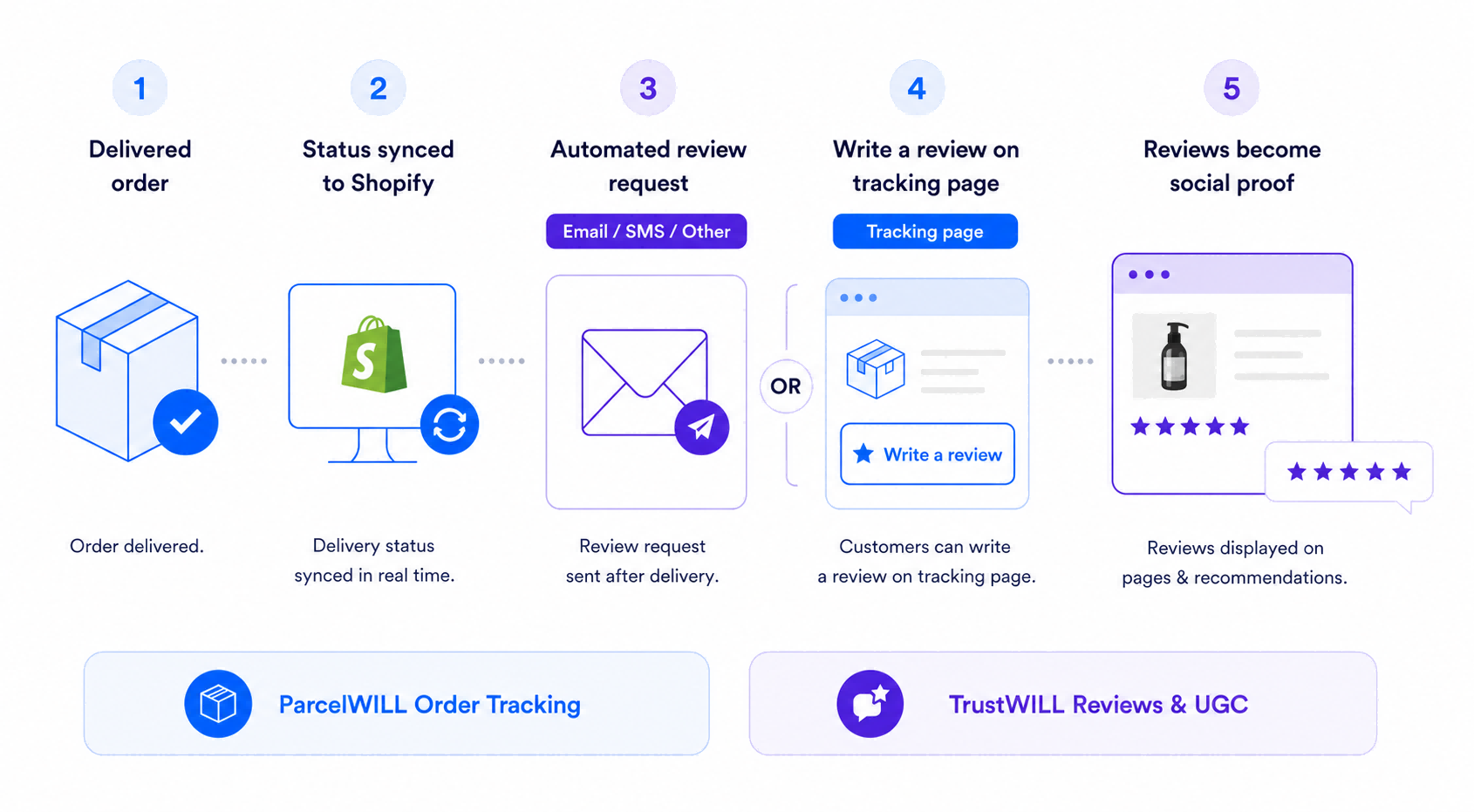
When a shipment is marked as Delivered, TrustWILL Reviews & UGC can use that delivery signal to schedule automated review requests through email, SMS, or other supported channels. The request content, timing, delay, and reminder settings are edited within TrustWILL Reviews & UGC, while ParcelWILL provides the delivery status and tracking-page context.
On the tracking page, eligible customers can also see a Write a review entry for a product in their delivered order. This entry opens the review form, giving customers a direct place to share feedback while they are already checking their order status.
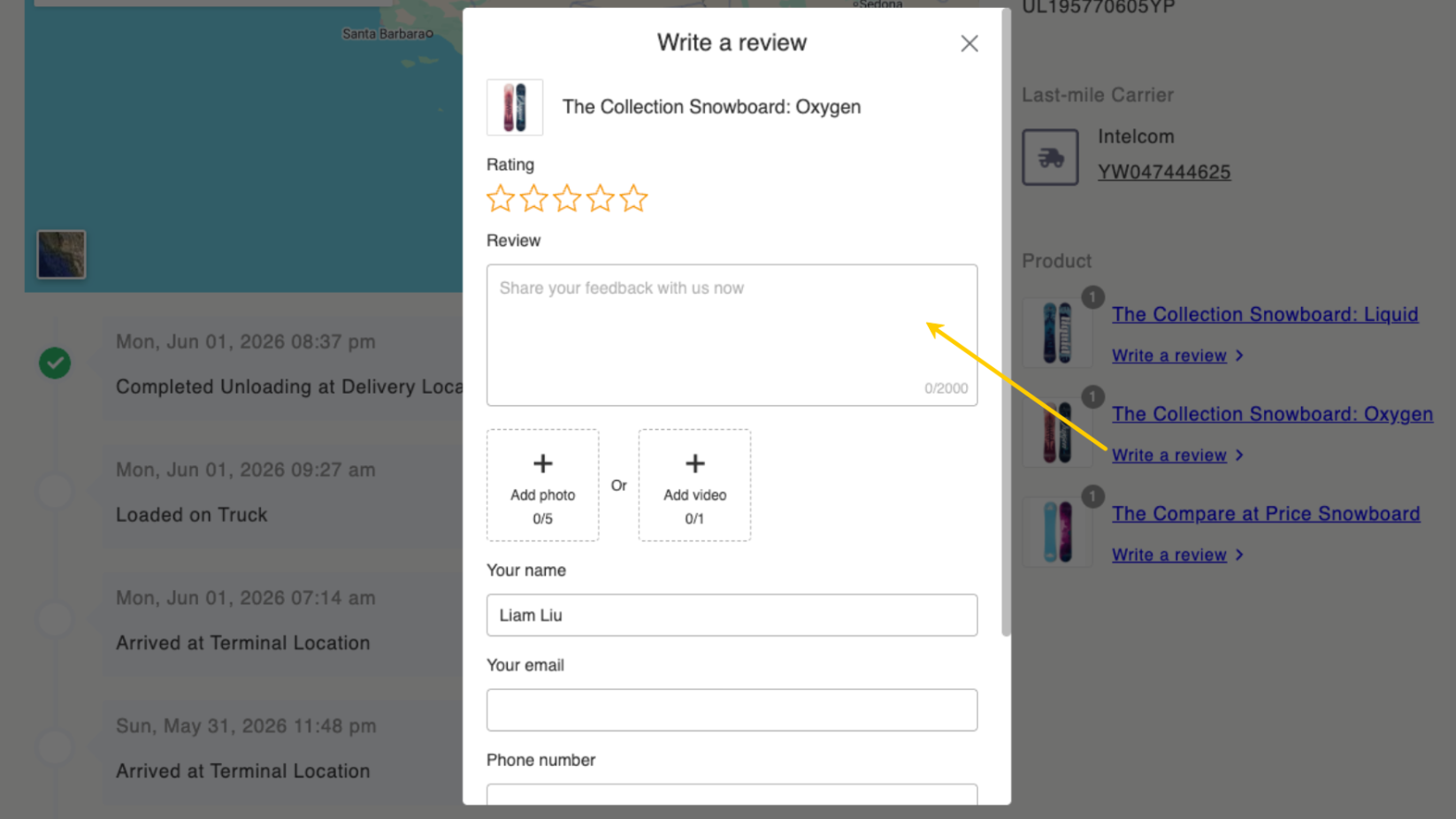
Together, this helps Shopify brands collect reviews when the order experience is still fresh and tied to the customer’s delivery moment, rather than relying solely on a fixed review-request schedule.
Turn Collected Reviews into Social Proof on the Tracking Page
After reviews are collected, they can continue to create value across the post-purchase journey.
With the ParcelWILL Tracking and TrustWILL Reviews integration, TrustWILL star ratings can appear on the tracking page alongside recommended products. This turns the tracking page into more than an order-status destination or review entry point. It also becomes a product discovery touchpoint.
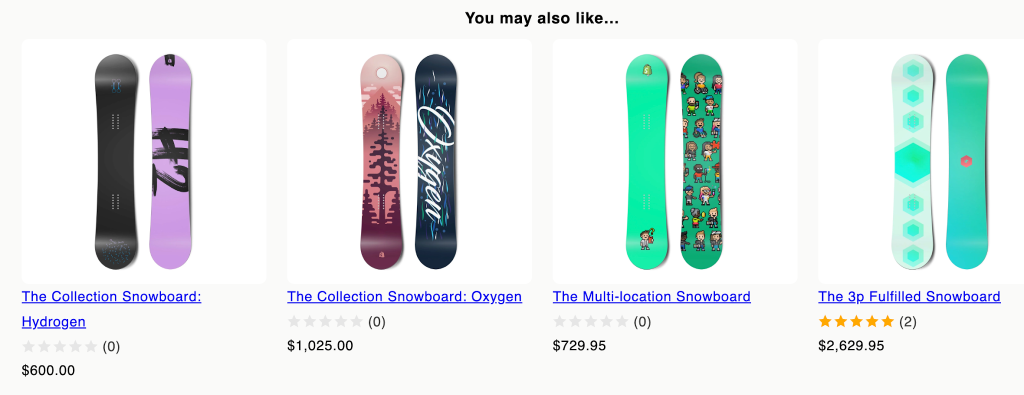
These ratings make customer feedback more visible in a post-purchase setting, adding social proof to product recommendations and helping encourage repeat purchases.
Explore ParcelWILL Order Tracking and TrustWILL Reviews & UGC to learn how each tool supports the workflow. If you’d like to connect them, you may also read the ParcelWILL Tracking and TrustWILL Reviews integration guide.
Conclusion
Delivery shouldn’t mark the end of the customer journey. It should give Shopify brands a reliable “signal” to begin a more relevant review-collection workflow.
When delivery status, product-experience timing, tracking-page engagement, and review requests work together, customers have clearer opportunities to share useful feedback. Those store reviews can then help future shoppers make more confident purchase decisions.
Explore how ParcelWILL Tracking and TrustWILL Reviews help Shopify brands turn delivery updates into product reviews.

Content Specialist
I’m passionate about creating SEO-friendly content that also resonates with readers. I take data and insights and turn them into actionable, practical ideas. My mission? Helping websites drive organic traffic and grow sustainably.