Key Takeaways
- The ideal window to ask for a review depends largely on your product type: 2–5 days after delivery for apparel, 10–14 days for skincare, and 21–30 days for supplements.
- Keep the review form to three to five fields, and make photos optional so they don’t block the review.
- Under the FTC’s Consumer Reviews and Testimonials Rule, you can reward reviews, but never only positive ones, and you should ask every buyer.
If you’re figuring out how to ask customers for reviews, the first step is asking at all: up to 20% of shoppers will give a review when asked. For an online store, the ask that works best is a short email sent after the customer has used the product.
The rest comes down to three things: when you send it, how quickly the customer can finish it, and how you handle rewards under the FTC’s rules.
When Should You Ask Customers for a Review?
Ask once the customer has received the product and used it enough to have an opinion. Count from the delivery date, not the order date, so a slow shipment doesn’t send the request before the package arrives.
Justin Risso, Head of Revenue at CWILL, sees the same pattern in merchant data: customers are most likely to review once they’ve used the product enough to have an opinion, while they’re still excited about it.
| Product Type | When to Send the Request |
|---|---|
| Fashion and apparel | 2–5 days after delivery |
| Pet products | 3–7 days after delivery |
| Skincare | 10–14 days after delivery |
| Home and living | 10–15 days after delivery |
| Fitness equipment | 14–21 days after delivery |
| Outdoor and travel gear | 14–30 days after delivery |
| Health supplements | 21–30 days after delivery |
Treat these as starting points, then test a few days earlier or later against your own response rates. If the first request gets no reply, send one reminder 5–7 days later. Skip the request entirely for any order with an open support ticket, and send it after the issue is resolved.
What’s the Best Way to Ask for a Review?
An automated post-purchase email is the most reliable way to ask for a review. Automated emails get 52% higher open rates than scheduled campaign emails (Omnisend 2025 Ecommerce Marketing Report), and customers expect to hear from you after they buy.
Email does most of the work, but it shouldn’t be your only ask. Here’s how the other channels fit around it, in the order a customer runs into them:
- Packaging insert: The first ask comes when the customer opens the box. A card with a QR code that goes straight to the review form catches them at their most excited.
- Post-purchase email: Your main request goes out on the schedule in the timing table above, once they’ve had time to use the product. Put the star rating inside the email for easy access.
- Reminder email: If they don’t reply, follow up 5–7 days later with a shorter note and the same link. Stop there.
- SMS: For customers who opted in to texts, send the reminder as a short text with the review link instead of a second email.
- On-site pop-up: When a past buyer comes back to shop, ask again on your site. Show it only to logged-in customers with a delivered order.
- Loyalty program: Customers earning points are already engaged, so add “write a review” as a way to earn in CWILL Loyalty & Referrals. The points must go to any review, positive or negative (see the FTC section below).
- Support follow-up: If a customer contacts support, hold the review request until the ticket is resolved, then ask about the product, not the support chat.
How to Ask Customers for Reviews by Email
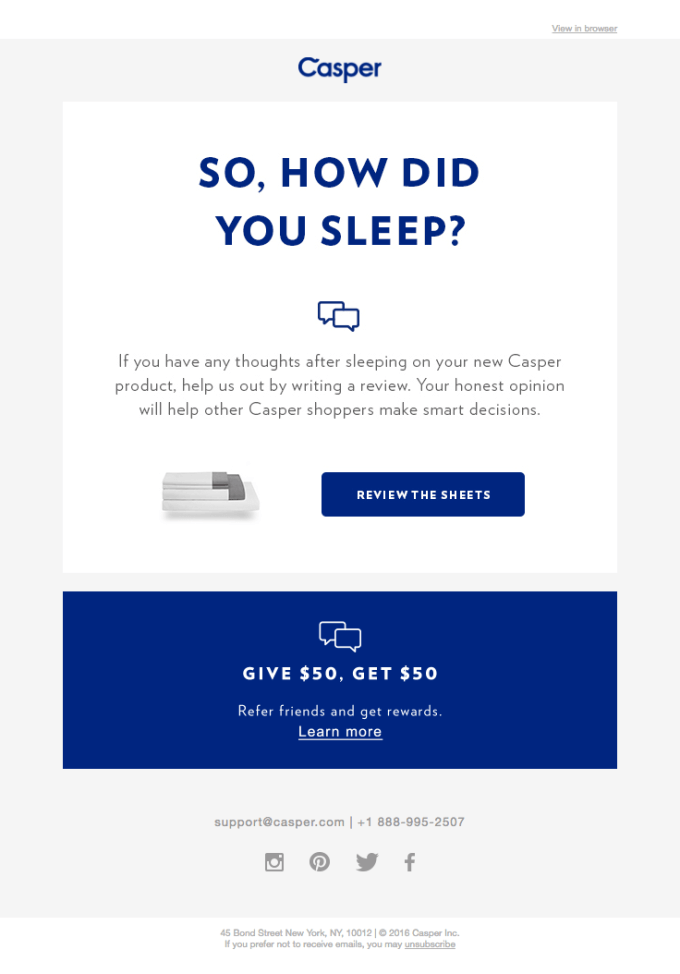
Casper’s review email asks one question that fits the product: “So, how did you sleep?” The button names the exact item, “Review the sheets,” and the copy asks for an honest opinion because it helps other shoppers decide.
The three templates below follow the same pattern, with one change: the star rating goes inside the email, so tapping a star starts the review.
Template 1: First Review Request
Subject: How’s your [product name] working out?
Hi [first name],
Your [product name] arrived on [delivery date]. Now that you’ve had some time with it, how would you rate it?
[1–5 star rating]
It takes under a minute, and it helps other shoppers decide.
[Store name]
Template 2: Reminder
Subject: Quick question about your [product name]
Hi [first name],
If you have a minute, we’d still like to hear what you think of your [product name]. Tap a star to start.
[1–5 star rating]
[Store name]
Template 3: Photo Review Incentive
Subject: Share a photo, get [10%] off your next order
Hi [first name],
Add a photo of your [product name] to an honest review, and we’ll send you [10%] off your next order, whatever rating you give.
[Write a review]
[Store name]
Can You Offer Incentives for Reviews?
Yes, as long as the reward goes to any honest review and doesn’t depend on a positive rating.
The FTC’s Consumer Reviews and Testimonials Rule, in effect since October 21, 2024, bans incentives “conditioned on” a review expressing a particular sentiment (FTC Q&A).
- Ask every buyer: Sending requests only to customers you expect to be happy, known as review gating, can violate the FTC Act.
- Reward every review: The same discount or points go to a one-star review as to a five-star one.
- Disclose the incentive: Label reviews that earned a reward so shoppers can see it.
- Don’t suppress bad reviews: You can contact an unhappy reviewer to fix the problem, but you can’t pressure them to take the review down.
For more details on this, see incentivized reviews and the FTC rules.
How Do You Make Leaving a Review Easier?
A customer who taps a star in your email has already said yes. What they see next decides whether they finish, so the form should be short, open without a login, and work on a phone. Check these four things before you turn review requests on:
- Ask for three to five things, no more: A star rating, a short text box, and an optional photo upload cover what most shoppers want to know. Every extra field is another place to quit. Add a fit or size question only if you sell apparel or shoes.
- Let customers review without logging in: The email link should open the form directly. A sign-in screen stops customers who checked out as guests and never made an account.
- Test the whole flow on a phone: Many customers will open the email on their phone, so go from email to submitted review on one yourself. Check that the stars are easy to tap and the text box isn’t hidden behind the keyboard.
- Make photos optional: Ask for photos, but don’t require them, or customers without a good one will skip the review. You can ask again after they submit, or use the photo reward in Template 3.
How Should You Respond to Negative Reviews?
Reply publicly within 48 hours, thank the customer, name the problem, and offer a fix. A clear reply shows future shoppers how you handle problems.
A reply can be three sentences: “Thanks for letting us know the zipper broke after two weeks, [first name]. That shouldn’t happen. We’ve emailed you a prepaid label for a replacement.”
Leave the review up. You can ask the customer to update it once the problem is solved, but under the FTC rule you can’t threaten or pressure them to remove it.
How to Automate Review Requests on Shopify
Use a reviews app that sends requests and reminders on a schedule, so you don’t have to send each one by hand. CWILL Product Reviews handles this for Shopify stores:
- Automated review request emails: Requests go out after each delivery, with automated reminder emails for customers who don’t reply.
- Past order sync: Send requests to customers who bought before you installed the app, so older products get reviews too.
- Photo and video incentives: Offer a small discount for reviews with photos or video.
- On-site pop-ups: Ask returning customers for a review while they’re on your store.
- Multi-language requests: Automated emails and reviews translate for customers in other languages.
Start With Two Emails
You don’t need a big program to get more reviews. Start with one review request sent at the right time for your product, plus one reminder a week later. Add a packaging insert next, then a loyalty reward once the emails are running.
Two rules hold no matter which channel you use: ask every buyer, and give the same reward to a one-star review as a five-star one.
Try CWILL Product Reviews free.

Content Director | 9+ years decoding B2C & B2B eCommerce, obsessed with SaaS and retail storytelling
Words are my weapon—crafting killer copy, decoding trends, and turning data into gold. When not strategizing: Coffee addict, pun enthusiast, and book lover. Ready to level up your eCommerce game? Let’s chat. ☕️