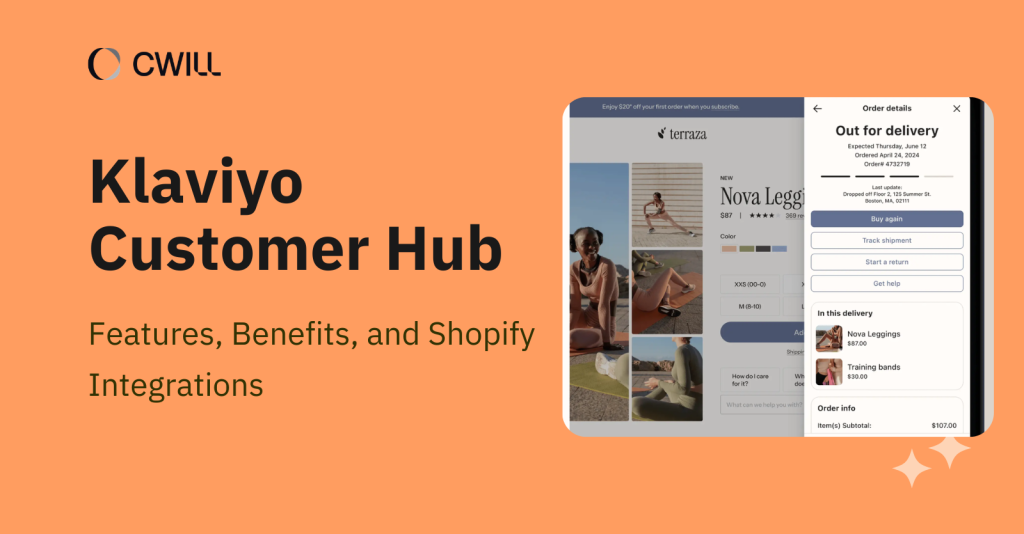
In 2025, Klaviyo Customer Hub was launched as a self-service portal for Shopify stores.
It gives customers “a centralized place” to browse products, manage accounts, track their orders, and get support from your online store. For merchants like you, this new tool reduces the burden on your support team and opens opportunities for more revenue.
In this article, we’ll show you what Customer Hub is. You’ll know how it works with Shopify, its main features and benefits, plus possible integrations to get more out of it.
What Is Klaviyo Customer Hub?
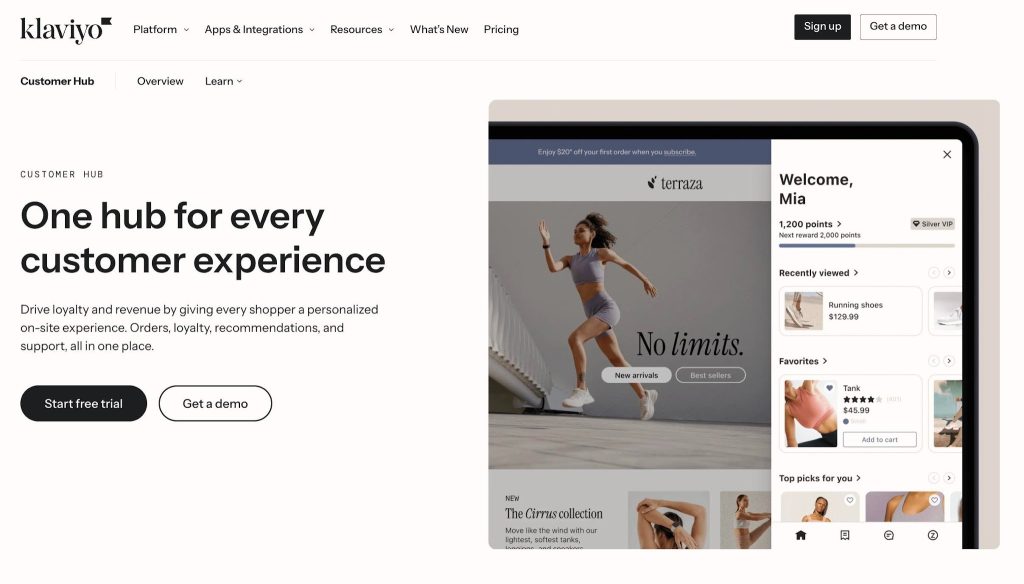
Klaviyo Customer Hub is an interactive, self-service dashboard that e-commerce brands can set up and offer their customers an upgraded experience. It helps automate some tasks that otherwise have to be processed manually.
With it, your customers can track orders, start a return, shop for more items, manage subscriptions, and get support from your team (or an AI-powered customer service agent).
In return, you get to learn about your customers and business growth. Klaviyo will provide real-time insights inside your own organized dashboard.
How It Differs from Klaviyo Email and SMS
Here’s a simple answer: Klaviyo email and SMS are for outbound communication, while Customer Hub is for on-site customer engagement.
So, you use the email and SMS features to set up campaigns and automated flows to share information and content at the right moments. But Customer Hub enables on-site interactions with orders, subscriptions, and loyalty activities.
The good news is that Klaviyo connects the data from both. What your customers do inside the hub (like favoriting a product) feeds into their Klaviyo profile and can trigger your existing email and SMS flows.
Plus, you can connect loyalty, returns, subscriptions, and support apps to your Customer Hub so the experience becomes more personalized.
How Customer Hub Works With Shopify Accounts
Klaviyo’s Customer Hub connects directly with your customers’ Shopify account setup (whether it’s on the newer or legacy version). After integration, it replaces the “default” account login page with a sliding drawer or floating panel like this:
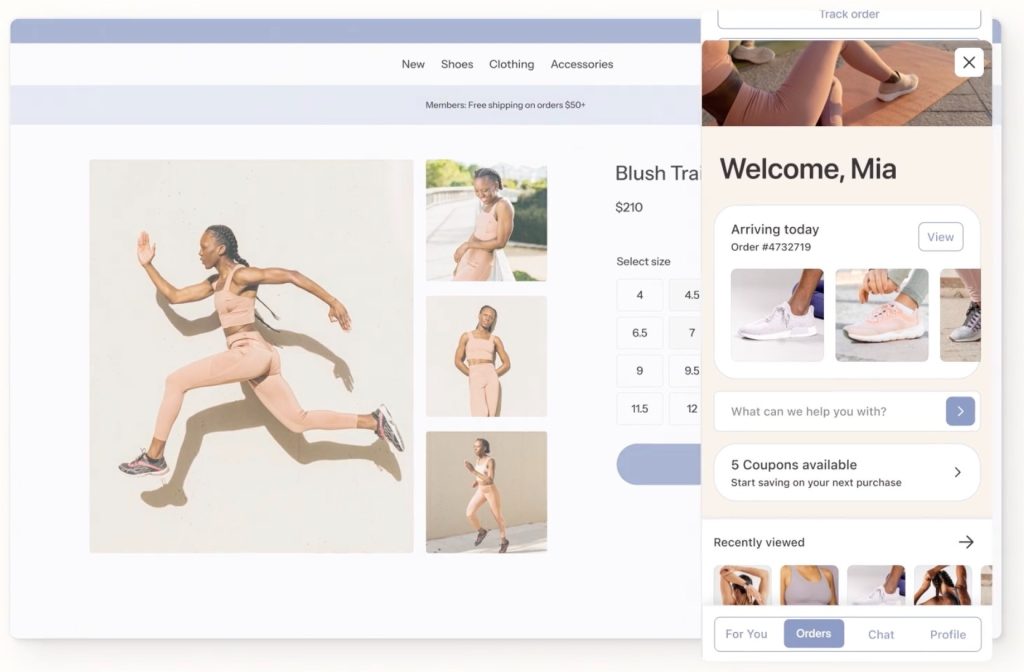
As for the data, this is what your customers can access depending on their account type:
New Shopify Accounts
Once your customers log in, they’ll get to access their order history and account details. They can also do more, like initiating post-purchase actions.
Since it runs on Klaviyo, the hub uses what it already knows about each shopper (like their past purchases and loyalty status) to personalize what they see the moment they open it.
Legacy Shopify Accounts
It works the same for legacy Shopify accounts. So, there’s no need to rebuild your existing account infrastructure. But you might have to check the compatibility of the other tools before going live, just to make sure everything connects properly.
Recognized Visitor Experience
The Shopify-Klaviyo Customer Hub connection also recognizes returning visitors through a browser token. Klaviyo can remember their data for up to 28 days… and show them recently viewed products, saved favorites, and a personalized greeting (even without logging in).
It allows you to improve customer engagement and also lower the friction that logging in every visit brings, while keeping privacy a priority.
Key Features of Klaviyo Customer Hub
You’ll get to do everything from managing orders and tracking shipments to handling returns, subscriptions, and personalized rewards or recommendations.
Order History and Account Details
Klaviyo Customer Hub allows online shoppers to get a summary of their recent orders and even check individual details (if they want to).
They can also easily repurchase any items through the “buy again” button. This “tiny” addition helps you improve customer retention with no effort on your part.
As for their account details, they can view and edit their profile data (name, email, home address) or even manage their SMS opt-in preferences. The convenience this feature gives allows your customers (who mostly love self-service anyway) to handle the simple stuff on their own
Order Tracking and Delivery Updates
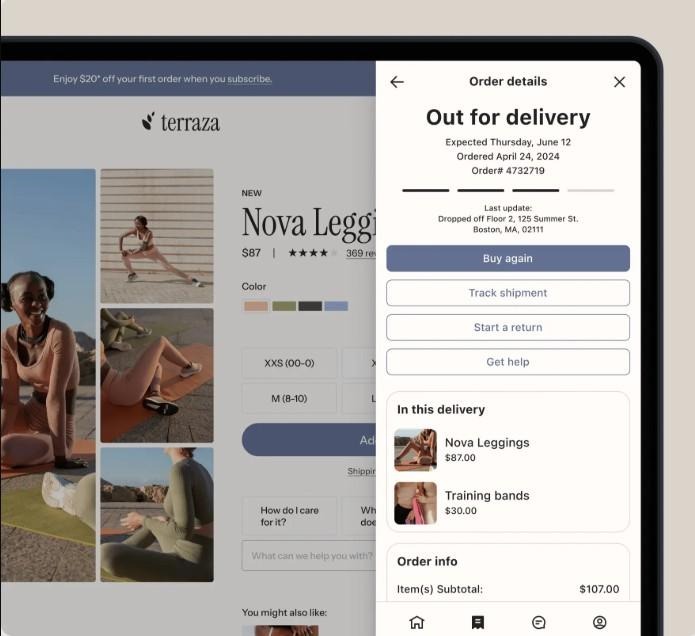
Your signed-in customers can check their recent orders and access shipment tracking within the Customer Hub. They don’t have to search through their inbox for updates anymore.
Online shoppers can view order status (with order date and number) and a link to track the shipment. They can also see the last location update from Shopify or a connected tracking app, so they’ll know whether their package is moving or not.
If they want to do something with a specific order, they can open it and check the items, repurchase the product, or contact support.
Since basic order information is available for customers to check anytime, it can reduce “Where is my order?” support requests for store owners.
Returns and Subscription Management
We all know how troublesome the manual return process is, along with returns and exchanges. It’s not good for customer experience and your support’s bandwidth.
Adding a “Start a Return” option inside the Customer Hub (for eligible delivered orders) is possible. But you’ll have to connect it with a supported returns provider app. Through this, your customers can begin the process inside the dashboard, while the return itself is handled through the returns platform.
Plus, you can tie them up to workflows (like sending a win-back offer after a return) so you get to “save” lost sales with automation.
But that’s not all. Customer Hub can also display subscription details. With supported subscription apps, shoppers can click through to the provider’s experience to view or manage their subscriptions.
Support, FAQs, and Live Chat
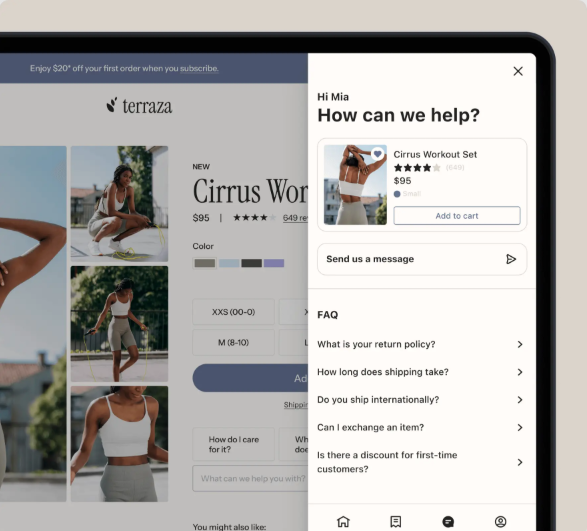
Even with a self-service platform, you must provide guidance and support for customers who need help. With Customer Hub, you can embed FAQs to answer possible customer questions and connect to a third-party helpdesk tool
You can activate web chat as well and connect it with Klaviyo’s “Customer Service Agent” or the Helpdesk. These additional Klaviyo service supports can improve the experience by providing multi-channel AI-assisted and human support.
* Customer Agent and Helpdesk are separate Klaviyo services that extend the support capabilities.
Rewards, Recommendations, and Favorites List
Customer Hub also allows you to make the experience more personalized and engaging. One thing your customers can do is check and redeem their loyalty points (through loyalty app integration).
They can also collect coupons, browse product recommendations, and save items to their “favorites” list. Then, these actions become a “signal” that you can use to send effective reminder emails to your customers.
And through content blocks, you can control what your online buyers see inside the hub. You can display loyalty updates, personalized coupons, or repeat-purchase prompts to specific customer segments.
Benefits of Customer Hub for Shopify Merchants
Okay. We now know the features it offers to your customers. But how about the benefits you can get from Customer Hub as a Shopify merchant?
Reduce Customer Support Workload
Klaviyo Customer Hub helps divert manual tasks to your customers themselves through automation.
With that, you can lower incoming WISMO tickets, return requests, and emails and calls because of common questions.
It also means your team can work on more serious issues, and your overhead costs will be manageable (you know… less overtime and manpower needed).
Improve Post-Purchase Engagement
Since Customer Hub gives customers a place to get updates, manage their orders, and revisit past purchases, it becomes an additional post-purchase touchpoint alongside your email flows.
You can measure this benefit through the following:
- Revenue generated from the “Buy again” option
- Customer Hub-attributed revenue
- Average order value (for customers using their account during checkout).
Enhance Customer Personalization
Customer Hub can view buyer “signals” such as browsing history, past purchases, saved items, and loyalty data, and use them to offer a more relevant on-site experience.
If your existing customers sign in, they’ll see previously viewed products, “you might also like this” items, or content blocks that show rewards and personalized offers.
On top of that, merchants can monitor the most effective retention strategy through Favorites-attributed revenue, top favorited products, content clicks, and click-through rates.
Enable Smarter Marketing Flows
Customer Hub can “feed” shopper activity back into your Klaviyo flows, and that allows you to create more powerful campaigns.
For example, when a customer saves a product to their “Favorites” list, that can trigger a Favorites Reminder flow.
Automating delivery-based messages (like shipping updates or review requests) can also be possible with shipment events from Shopify or third-party tracking integration.
💡See how Klaviyo post-purchase flows and top retention flows drive repeat purchases.
The Role of Order Tracking Data
Post-purchase experience won’t be complete without order tracking. It’s a staple that your customers expect from the moment they place an order.
What Customer Hub Displays
By default, Customer Hub can display:
- Order status
- Order date and order number
- Order items and cost summary
- Links to repurchase or track the shipment
Where Tracking Data Comes From
Customer Hub uses Shopify order and tracking data by default. This provides customers with basic order status information. And if they click the “Track shipment” button, they’ll be welcomed by Shopify’s tracking page.
For merchants that need more detailed or accurate shipment visibility, it’s better to connect to another tracking tool. Customers may see additional delivery details like estimated delivery dates, progress updates, or a link to a branded tracking page. But the available features will depend on the app and setup.
How Tracking Data Supports Flows
Accurate tracking data helps messages reflect what is actually happening with each package. It makes the post-purchase communication more relevant and useful.
When shipment events are synced into Klaviyo, merchants can use the available metrics to trigger post-purchase flows based on a package’s actual progress.
For instance, a delivered shipment event can start a review request or product care flow. Plus, other delivery-status events can be used for proactive shipping updates.
It allows more timely messaging instead of simply setting up a fixed delay after fulfillment. On top of that, some tracking integrations provide even more data that may be used to personalize messages with relevant shipment details.
Importance of Real-Time Shipping Information
You don’t want your customers to get delayed or inaccurate tracking, because that’s an effective way to lose their trust. And we all know what the “consequence” of that is.
Real-time shipping data allows you to provide proactive and automated updates so your customers always know where their order is.
If you do that, you can improve customer satisfaction and also increase engagement.
How ParcelWILL Enhances Tracking Experiences
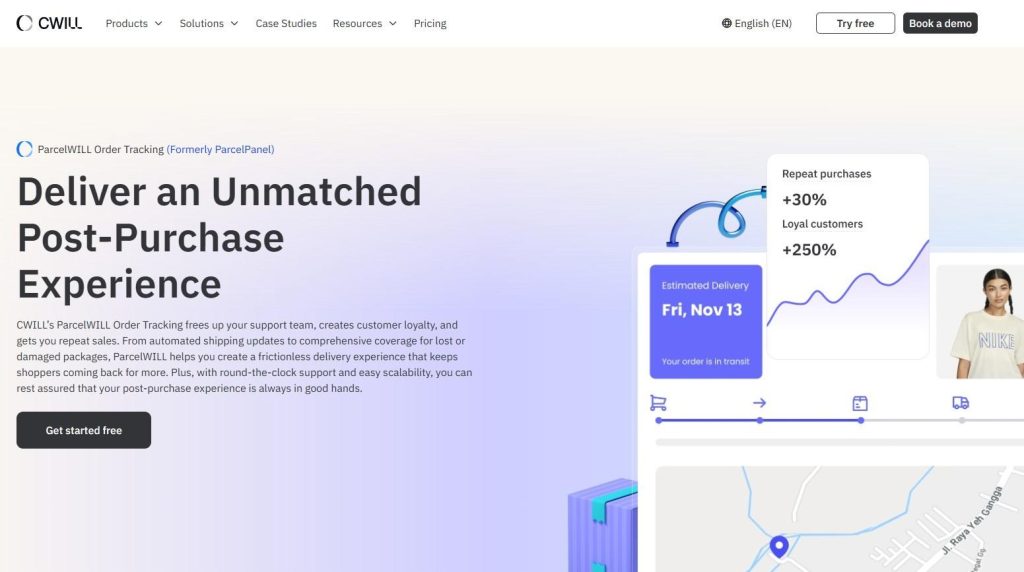
ParcelWILL Order Tracking is a Shopify order tracking solution that helps merchants provide timely shipment updates, accurate tracking visibility, and an on-brand post-purchase experience.
It complements Klaviyo Customer Hub by improving the tracking experience behind customer accounts.
Providing Real-Time Shipment Updates
ParcelWILL Order Tracking offers the following features for ecommerce brands and their customers:
- Real-time status updates like “In transit,” “Out for delivery,” “Delivered,” or “Failed attempt.”
- More detailed shipment progress, including current location on a map, estimated delivery date, and a full tracking timeline
- Accurate carrier details, as it partners with 1,400+ global carriers
- A branded tracking page under your own domain (so every post-purchase visit stays on your store)
Supporting Customer Hub Post-Purchase Flows
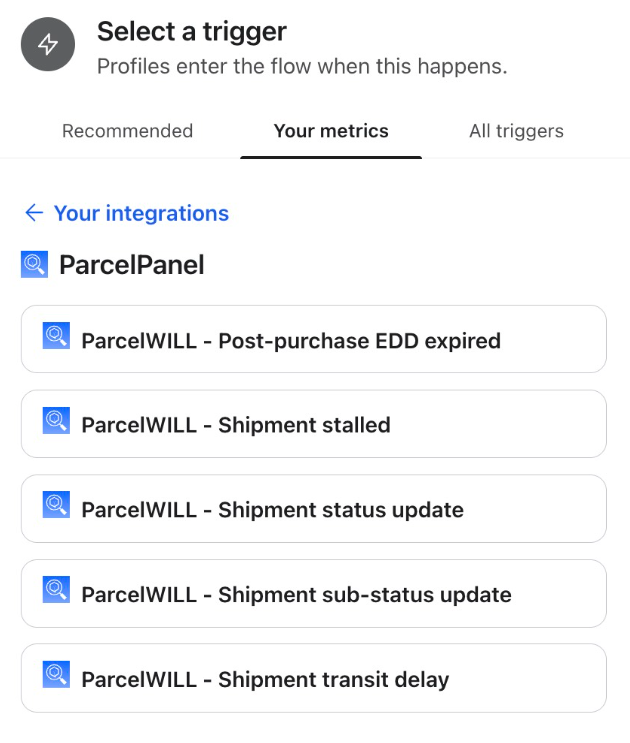
Shipment events from ParcelWILL can sync into Klaviyo, and that allows merchants to trigger metric-based flows.
Here’s an example of what it can do: Once an order moves to “in transit,” it can start a delivery reminder flow and send your customer a heads-up that their package is on the way. Or, it can send a care instruction email once your customer’s item arrives.
ParcelWILL doesn’t replace Customer Hub. What it can do is improve post-purchase communication with more detailed data and additional flow opportunities.
We suggest that merchants verify the available event fields in their integration setup so that flow triggers will function properly.
You can check how it integrates with Klaviyo Customer Hub.
Considerations for Shopify Stores
Before we end this article, we want to share with you the best use cases and points you need to consider to implement the hub smoothly:
Best Fit Use Cases
We recommend Customer Hub for Shopify stores that are already using Klaviyo. It’s a great addition if you want to provide an on-brand, unified account experience for your customers.
Take Ministry of Supply, for example. With the Customer Hub, this Shopify apparel brand has recorded over 12,000 self-serve support interactions in just one year… and a downward trend in their email tickets.
Ecommerce brands that see high support volume or are selling items that make their post-purchase process more complicated (like subscriptions or multi-item orders) can also get a lot of value from this. Just make sure your tracking integrations are compatible before going live.
Key Points Before Implementation
Speaking of “compatibility,” it’s a good idea to review your current apps and workflows before you set anything up.
You must go through your accounts, tracking, support, subscriptions, and marketing flows, and check if they connect with Customer Hub. On top of that, you should confirm if your Klaviyo plan meets the requirements.
Ensure your Klaviyo plan supports Customer Hub based on your active profile count.
Don’t forget to set some baseline metrics too. These are what you’ll “measure” to see whether your brand is better with the hub. That includes support ticket volume, email open rates, and repeat purchase rate.
FAQs About Klaviyo Customer Hub
Does Customer Hub replace Shopify customer accounts?
No. Customer Hub works with existing Shopify accounts to sync order history, account details, and loyalty or subscription information. Shopify accounts remain the “source of truth” for all customer data.
Do shoppers need to log in to use Customer Hub?
No. Some Customer Hub features are accessible without logging in. For example, returning visitors can see their recently viewed products, save favorites, browse FAQs, and access support. But if they want the full account-specific experience, they’d have to sign in to their account.
Which Customer Hub features require third-party integrations?
These are the features that need external apps and possible tools to use:
- Returns: Providers like Loop or AfterShip
- Subscriptions: Apps such as Recharge, Skio, or Ordergroove
- Loyalty & Rewards: Platforms like Smile.io or Yotpo
- Advanced Order Tracking: Services such as Wonderment or Malomo (for more detailed shipment updates)
But basic account management, order history viewing, and repurchasing items can work natively.
How much does Klaviyo customer hub cost?
Customer Hub is priced separately based on your active profile count, with plans currently starting at $20 per month for up to 10,000 active profiles. Because pricing can change, we advise checking Klaviyo’s pricing page before implementation.

Content Specialist
I’m passionate about creating SEO-friendly content that also resonates with readers. I take data and insights and turn them into actionable, practical ideas. My mission? Helping websites drive organic traffic and grow sustainably.