Key Takeaways:
- Post-purchase surveys allow you to collect information to help segment and understand your existing customers as well as decrease the CAC of new customers.
- Store ratings on Google Search text ads lift click-through rate by 2% on average, according to Google.
- Collecting product reviews and segmentation information helps you guide new customers through purchase decisions.
- Properly timing reviews is critical to avoid customer confusion, and requires deep software integration with Shopify.
Most post-purchase surveys happen right after customers complete an order. If you want to get responses about attribution and website experience, that’s a good time. The problem is that customers haven’t received the product yet. You’re asking for feedback before they’ve had a chance to use what they bought.
If you’re just sending one immediate survey, you’re missing out on an opportunity to get valuable feedback and reviews about what you sell. That’s the gap Justin Risso, Head of Revenue at CWILL, sees most often: brands stop asking at checkout, right before customers have anything to say about the product itself.
What Is a Post-Purchase Survey?
A post-purchase survey is a set of questions you send to a customer after they buy something from you. It helps you track post-purchase behavior and encourages customers to interact with your brand.
Review requests are also surveys, and Justin explains that reviews are often split between two purposes:
- The website and purchasing process experience: Website reviews facilitate Google seller ratings, which impact how your ads and organic listings perform in search results. Including store ratings in ads has a direct impact on click-through rates—an average 2% lift according to Google’s data.
- The customer’s experience with the products themselves: Justin explains that product reviews “can be used for shopping listings on the search engine results page, using schema markup to show star ratings per product details page (PDP).”
Website experience surveys usually work best on post-checkout thank-you pages, while the experience is fresh and the customers are still engaged in the activity. If they skip the onsite form, you could send reminders via SMS or email with the order confirmation.
When it comes to product reviews, time them based on your shipping processes. Then, send surveys via both email and SMS after customers receive what they buy. Email lets you get more creative with messages and design, but SMS reminders can significantly shorten response times.
Sending surveys at the right time to capture these data points helps your performance in search engines, but algorithmic benefits are just the start. Product experience reviews do the most work moving new customers through consideration stages. Every data point (even a 1-star review) is valuable, if you know how to use it.
Why You Should Collect Customer Feedback After Checkout
Justin explains that post-purchase surveys solve two critical problems for ecommerce brands:
- Collecting information that allows you to more accurately segment and understand your customers.
- Collecting information that you can use on PDPs that inform new shoppers and make them feel more confident making a decision for the first time.
To get all of this information you need to send multiple survey requests at different times. To use it effectively, you need to be prepared to act on it in your ad budgets, remarketing efforts, and follow-up campaigns.
Segment Customers by Who They Are and Who They’re Buying For
Immediate post-purchase surveys offer an opportunity to get basic biographical information like age, gender, and intended recipient.
Every future response you get can be tied to what matters to this customer and future customers. With these data points, you can provide smart recommendations on your website and in follow-up communications.
Help the Next Shopper Decide With Answers From People Like Them
Survey answers also let new shoppers filter your reviews down to people who have similar preferences. You can start with the biographical information we talked about earlier, but this is an opportunity to get super specific about product recommendations. Get detailed about the problems customers face and their preferences related to what you sell.
- Do you sell skincare products? Ask about their skin type (oily, dry, or combination) and whether they have skin concerns.
- Do you sell mattresses? Ask about their favored sleeping positions and what temperature they prefer to sleep at.
- Do you sell work boots? Ask whether they have wide feet, or how many hours they spend on their feet.
With this data, you could power a pre-purchase survey that recommends products to customers directly. You could also let customers do this themselves: add product review software to your Shopify store and add tags to a customer’s review based on their survey responses. Then, let visitors sort reviews by tags.
Understand Who Buys and Why
All this demographic data also helps you understand buying habits and loyalty behavior. Who buys what, who comes back, who leaves reviews?
Focus on who chooses you and why. That gives you direction as you develop or curate new products.
What Questions Should You Ask in a Post-Purchase Survey?
Start with how you intend to use the answers, Justin advises. Survey fatigue could cause customers to abandon a survey if it’s too long, so focus on what you need most. Here’s a bank of potential questions, and then we’ll explain some of the most important categories:
Post-Purchase Question Examples
After a customer completes a purchase, find out about their experience with your website.
Attribution:
- Where did you first hear about us?
- Why did you choose to shop with us?
- Did positive customer reviews influence your purchasing decision?
Purchase process:
- How satisfied are you with our website?
- Did you find everything you were looking for? / Did you have trouble finding anything?
- How difficult or easy was it to complete your purchase?
Basic demographic information to inform future messaging:
- How old are you?
- What is your gender?
- Is this purchase for you or a gift?
- What [country/state] do you live in?
Product Review Question Examples
After a customer receives an item, follow up and ask about their experience with the product.
Shipping and accuracy:
- Did the product arrive when you expected it to?
- Was it the right color, size, and material?
Product quality:
- Does the product fit you?
- Is the product comfortable?
- Do the product features work as you expect them to?
Product experience:
- How satisfied are you with [product/feature] on a scale of 1-10?
- How / when do you use the product?
- How often do you use the product?
- How helpful was the [support/product documentation/video guide]?
- [If the product was a gift] How did your recipient feel about their gift?
Reviews and recommendations:
- How likely are you to recommend the product?
- Would you be willing to write a review? You’ll earn [X] points toward your next purchase.
Who Your Customer Is (Gender and Age)
Basic demographic sorting is easy to get (customers are used to providing it), and can form the core of your segmentation, and then you add more details on top as you get them. Gender and age are the two most important, and they can inform everything from marketing channels to product development.
Although gender can be a sensitive subject, it’s still important to collect. The important thing, Justin notes, is allowing people to describe themselves how they want to.
“Age, I think, is also pretty important. Are we seeing that we are resonating with a younger crowd? … An older crowd? That can change your marketing materials. It can change your aesthetic. It can change the design. It can change the product.”
Where Your Customer Lives
Location can be very helpful when you’re planning follow-up communications, promotions, and remarketing.
“Hey, you’re buying swimsuits, and you’re in the Northeast.” Justin notes this can be critical budget information. “I know that between September and March, I’m probably not gonna be doing a ton of marketing to you.”
So you shift that budget to someone in the Southwest in the fall. The water’s warm and the tourists have gone home. Get out to the beach!
Why They Chose You (and When to Ask How They Found You)
“How did you hear about us?” is the most common post-purchase survey question, but Justin isn’t convinced it’s that useful. Customers tend to name their most recent interaction with your brand, not the first one, and good tracking already covers most of it:
“It’s relevant, but … is it really, if you’re using UTMs? You should, in theory, be able to understand where people are coming from in that way and how they’re hearing about you.”
The catch is that UTMs only track clicks on links you tagged. Podcast mentions, influencer posts without links, friend recommendations, AI chatbot answers, and offline marketing usually show up as “direct” traffic. If you invest in those channels, ask one multiple-choice question: “Where did you first hear about us?” Including “first” reduces recency bias. If nearly all your growth comes from tagged ads, emails, and texts, skip it.
Either way, ask the question Justin prefers: “Why did you decide to shop at our brand?” The reason tells you what to say, and because you’re asking for the customer’s opinion, their bias is the answer you want.
Who the Purchase Is For
Justin adds that you should also find out who the shopper is purchasing for and who might be in their household.
“As you’re building dynamic campaigns, you’re also segmenting … that will tell you whether or not you should waste resources continuing to market to these people.”
It doesn’t make sense to run in-depth remarketing campaigns to someone buying a one-off gift for their grandson. Or maybe ask whether it’s a birthday gift, and get in touch again in a year.
How the Product Fits Them
You’ve gathered information about the specific issues customers face related to your product. You know the product details, so once it arrives, follow up and see how their experience matches their expectations.
Did they purchase clothing? Ask about:
- Whether it’s the right color and fit.
- Whether it’s comfortable.
- Whether features like temperature control or sweat-wicking work well.
Did they purchase a mattress? Ask about:
- How hot or cold they feel at night.
- Whether it meets their expected level of firmness or softness.
- How easy it was to set up.
These answers help you to create powerful consideration engines, like quizzes and review search features, that customers can use to choose products.
When to Send Each Survey
You need multiple touchpoints and reminders if you want to make the most of survey data. This helps you get a full picture of a customer’s experience. Remember that there are also two kinds of reviews you need at different times: website and product.
Right After Checkout: Ask About the Shopping Experience
As soon as the transaction is complete, right after the checkout window, you want to ask about the website and checkout experience. Justin notes how important this is for optimizing your on-site funnels and cart experience:
“… that site review request is gonna be about how your experience was on-site. Was [the] transaction easy? Was the information easy to understand?”
This also helps with that discovery element we talked about earlier. Improving your website experience and attracting more good reviews gives you an asset to display on search engines.
After Delivery: Ask About the Product
Here’s where those product-focused questions come in, but you’ll need to be careful about the timing. Context-dependent reviews will be critical here to ensure you get useful answers from customers.
Justin explains: “After it’s been marked as delivered, depending on the product, you could either send a review request that day because [of] maximum excitement.”
You can turn delivery updates into product reviews by combining the update with the ask, because it’s a natural moment to ask for feedback.
But that might not be the best time. “You’re sending somebody a bathing suit to Idaho in December, maybe don’t ask them how the product was.” But you could ask them whether it arrived as they expected: the right color, size, and material. Then, depending on the product category, follow up and ask for a review after they’ve had some time to use it.
Who the customer was buying for matters here, too. Remember the customer buying a gift for their grandson? She probably doesn’t know how the item fits or feels. But she can speak to the emotional experience of giving it, and whether her grandson likes it. You might want to wait for longer before you ask for this review, until after a major holiday or a couple of weeks after delivery.
Why Delivered Status Beats a Guess Based on Fulfillment Date
“After delivery” are the key words when it comes to product reviews. With the wrong timing, you might send a review request before the customer gets what they ordered. Best case, they ignore your message. But Justin says there’s a common worst case:
“That’s gonna be the quickest way for you to get one and two star reviews, because people never respond with, oh, it hasn’t arrived yet, but I’m feeling hopeful. People are always, it hasn’t arrived, and you’re writing an email to me? What an inconsiderate thing to do.”
If you build email automations on estimates or your understanding of shipping flows, then you’re likely to mistime these requests. You need a clear understanding of your shipping and delivery times, but you might not be able to get it natively in Shopify.
Justin explains: “The ability to mark something delivered requires [a] deeper level of integration with your shipping vendors to be able to supply that status in Shopify.”
CWILL helps you keep your customers updated about shipping as well as track what’s happening across every shipment. Now, you can base your follow-up marketing on confirmed arrival dates.
How Many Questions to Ask and Which Formats Get Answered
There’s a hierarchy to how people engage with your surveys, and it goes from least to most effort. The easier you make the question to answer, the more likely you’ll get one, so keep this in mind when you’re asking for responses.
Justin explains that for the most part, questions fall into three categories in order of effort:
- Multiple choice, single answer (or creative options like sliding scales)
- Multiple choice, multiple answers
- Free text
Free text gets you the most information, but people will be least engaged with it. Keep in mind, as well, that more information per question also becomes a burden on you to analyze.
As for how many questions to ask, there’s a balance. Are all of them mandatory, or are you making some of them optional? Are they all simple multiple-choice questions with 4 possible answers? Or are you asking people to choose between 12 options?
As a general rule, cap review request surveys at five or six questions at most. But pay attention to the collective mental load. If you’re asking people to scroll down or provide complex answers, you may need to ask fewer questions or make them optional. Justin doesn’t advise that you make free-text questions a requirement, because you’re likely to lose the whole survey.
“I generally don’t recommend making anything beyond the content and the number of stars a required field, just because it can deter people.”
How to Use Survey Answers on Product Pages and in Marketing
We talked earlier about using the data you get from surveys to help customers make decisions. Let’s take a look at how Nectar Sleep does it. They have over 55,000 reviews on their website. No one’s reading all of those, and it’s hard to trust any one review among them. But the page has filters, and so now Justin can ask:
“How does this mattress work for people who sleep on their stomach in cold weather in my age range? And so now 55,000 reviews have been parsed down to 151 people who are exactly like me.”
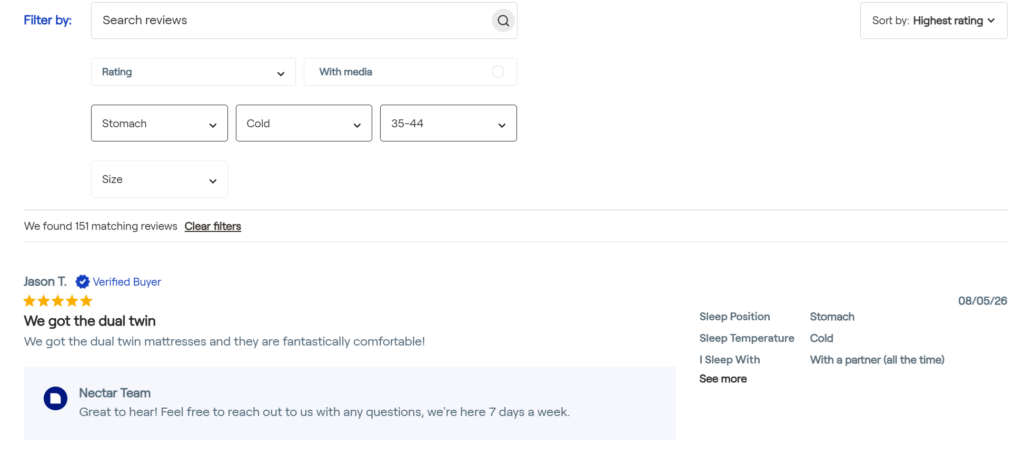
We can also see what size they purchased, whether they sleep with a partner, and if we want to find reviews with photos, there’s a filter for that too. There are two critical ecommerce customer experience strategies at play here.
- You’re letting people personalize recommendations so they have more confidence the purchase will be a good experience for them.
- When they interact directly with your website and use filters, customers become more anchored in the purchasing journey.
Good filtering also helps to contextualize negative reviews. They’re tough to deal with, because screening out negative feedback can land you in hot water. But what if the negative reviews can have a positive impact?
If one of your products was too warm for other stomach sleepers, Justin might like to know that. Then the product he does choose will be a better experience.
Remember, by using filters, shoppers are already becoming invested in the purchase, so they’re more tolerant of negative reviews than you might think (as long as they’re useful).
“You could go and buy an office chair, you get the office chair, and you’re like, hey, one star, this office chair was way too small. But then somebody else looks at it and [says], perfect, that office chair is exactly the size I needed. A bad review to one person isn’t a bad review to everybody.”
Common Mistakes That Lower Response Rates and Ratings
A mistake in your timing or how you build the surveys could mean you waste the opportunity or even inspire a 1- or 2-star rant. Let’s recap:
- Sending a product review request before delivery
- Asking too many questions
- Having too many required fields in your surveys
- Asking questions you don’t plan to act on
- Asking product experience questions on purchase thank-you pages
- Asking product experience questions to people who bought gifts
The good news is that these are all solvable data problems. Collecting the right data helps you create segmented messaging automations. Then you can ensure the right message reaches the right customer at the right time.
How to Start Collecting Survey Answers on Shopify
- Start by deciding what data will be most impactful for your analytics and new customers.
- Then choose your follow-up moments (we suggest right after checkout and then a few days after delivery).
- Connect your Shopify store with CWILL’s order tracking system to provide automated updates.
- Add relevant review questions to each stage: website and checkout experience questions after the order, and product questions after delivery.
- Combine review requests with a rewards program and offer points for completed surveys.
CWILL helps you build loyalty programs, get more reviews, and turn reviews into sales with post-purchase software that makes your Shopify store more powerful.
Frequently Asked Questions
Surveys about your website and the purchase experience should appear right after the checkout process. But don’t ask product questions right after checkout, because your customer can’t answer yet. Instead, wait until a few days after the item arrives, depending on what the product is.
A customer review is a public-facing opinion that a customer posts either on a dedicated review platform (like Google) or on your website, which you can facilitate with a Shopify reviews plugin. A survey is a set of questions that you send to a customer that they answer, and you can use those answers for segmentation or for additional review context.
Post-purchase experiences include thank-you pop-ups, post-purchase surveys, shipping notifications, and review requests.
To convince customers to fill out surveys, make sure that you’re sending them when the customer is most engaged. Get feedback about your website right away, and then send a follow-up survey after they receive the item. Also, make sure your surveys aren’t too long, no more than six questions.
Only if a meaningful share of your marketing happens where UTMs can’t track it, like podcasts, influencers, word of mouth, or offline channels. If you ask, phrase it as “Where did you first hear about us?” to reduce recency bias, and pair it with “Why did you choose us?” to understand motivation, not just the channel.

Freelance Writer & Editor
Ben Steele is a content strategist with over 9 years of experience in SEO. A self-described content goblin, he’s widely recognized for his contributions to SEO and PPC as a curator and editor of expert voices. He usually spends his time with his daughters, writing, or playing video games. Or doomscrolling LinkedIn. No one’s perfect, right?